
The problem
Most authentication systems focus on keeping unauthorized users out. But they do nothing to stop someone from creating multiple fake accounts with different emails. By the time you detect fraud, the damage is done.
I wanted to flip the approach: prevent fraudulent accounts at registration, not after. If you could verify that each account belongs to a unique real person, the whole problem changes.
What I built
Face Guardian uses facial recognition combined with device fingerprinting to verify identity at registration. The system stores face descriptors (not images) for privacy, detects spoofing attempts like photo replays, and integrates via OAuth so other apps can use it easily.
I also published it as an npm package so developers can integrate facial authentication into their own projects.
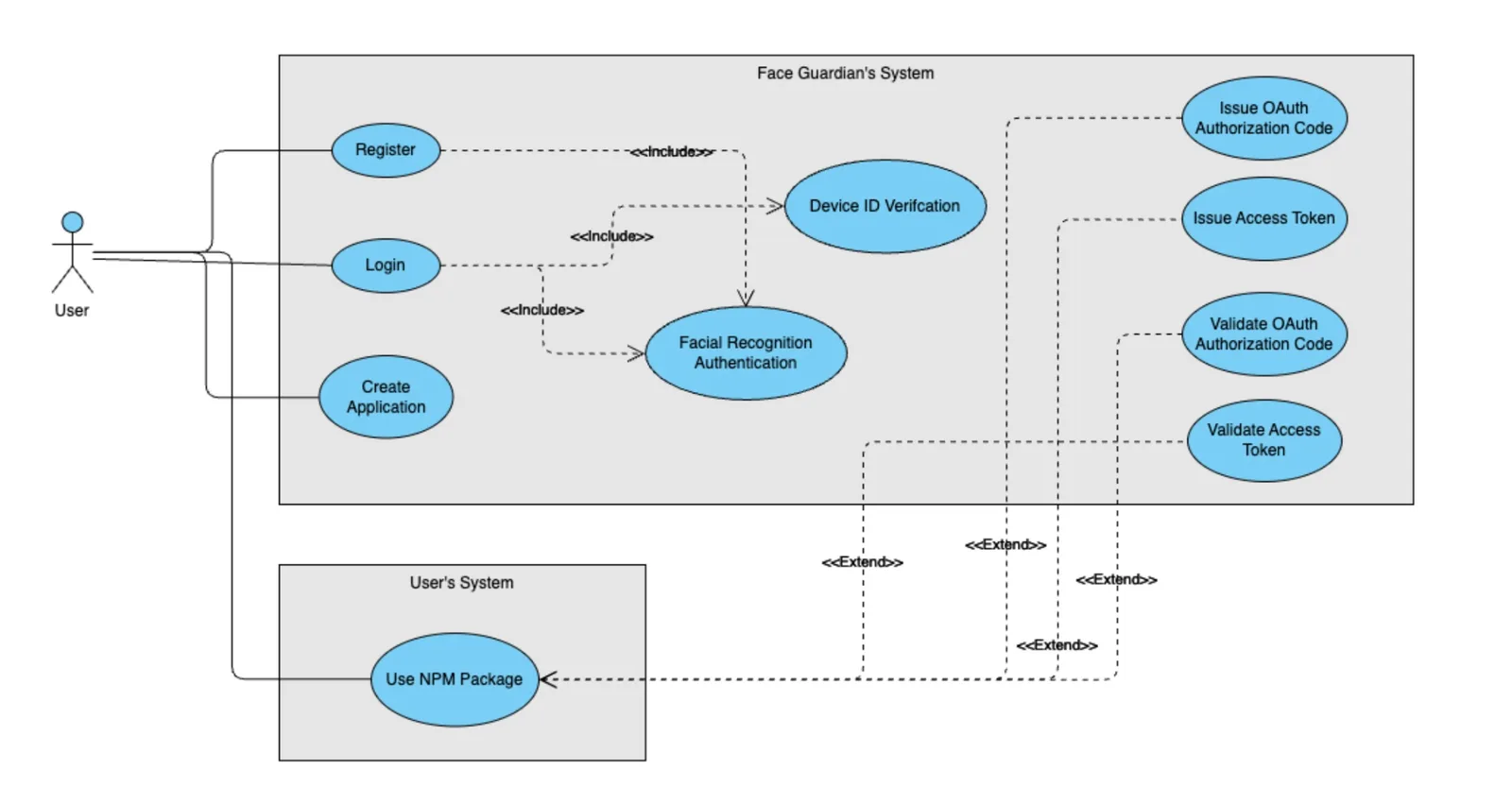
The journey
The facial recognition uses the Histogram of Oriented Gradients algorithm through the dlib library, wrapped by face-api.js for browser compatibility. The tricky part was making it work reliably in browsers with varying webcam quality and lighting conditions.
Tech stack
| Layer | Technology | Why |
|---|---|---|
| Frontend | Next.js | React with SSR |
| Face Detection | face-api.js | TensorFlow.js based, runs in browser |
| Auth Protocol | OAuth 2.0 | Standard protocol for integration |
| Fingerprinting | FingerprintJS | Device identification |
| Hosting | Vercel | Easy deploys with edge functions |
What building this taught me
1. Privacy by design changes everything
Storing face descriptors instead of actual images was a deliberate choice. Users are more comfortable when they understand their photos aren't saved anywhere. This also reduced storage costs and simplified GDPR compliance.
// What gets stored (128-dimensional vector)
const faceDescriptor = Float32Array(128)
// NOT the actual image

// Comparison uses Euclidean distance
const distance = faceapi.euclideanDistance(descriptor1, descriptor2)
const isMatch = distance < 0.6 // threshold
Resources on face embeddings:
- FaceNet Paper explaining face descriptors
- face-api.js Documentation
2. Anti spoofing is harder than recognition
Getting the AI to recognize a face is straightforward. Detecting whether that face is a real person or a photo held up to the camera? Much harder.
I implemented smile detection as a liveness check. The user has to smile during capture, which is difficult to fake with a static photo.
// Liveness check: detect smile
const expressions = detection.expressions
const isSmiling = expressions.happy > 0.7

if (!isSmiling) {
  throw new Error('Please smile to verify liveness')
}
Resources on anti spoofing:
3. Lighting kills accuracy
The system works great in good lighting. In dim rooms or with backlighting, accuracy drops significantly. I spent a lot of time on preprocessing to normalize images, but there's only so much you can do when the input is bad.
4. Calling something OAuth does not make it OAuth
I shipped an authorization-code flow and described it as OAuth 2.0. It borrows the
shape of OAuth and skips the parts that do the work. /api/request-token takes a code, looks the row up,
and hands back the token:
const { data } = await supabase
  .from('tokens')
  .select('token, expiration_date, created_at, is_revoked')
  .eq('code', authorizationCode)
  .single()
There is no client authentication, so client_secret is never checked even though the column exists and
is generated for every app. There is no redirect_uri validation, no PKCE, and the code is never marked
used, so it is replayable until it expires. RFC 6749 requires all four. What I built is a bearer code
lookup, and the standardized flow the npm package advertises is the one thing it does not implement.
// Simple integration with the npm package
import { FaceGuardian } from 'face-guardian'

const guardian = new FaceGuardian({
  clientId: 'your-client-id',
  redirectUri: 'https://yourapp.com/callback',
})

// Start authentication
await guardian.authenticate()
Testing results
Held-up photos did not get past the smile check, and usability testing showed people liked the registration flow but not its error messages: when recognition failed, they could not tell why.
I used to quote a "100% blocked" figure here. It measured the wrong thing. /api/authenticate-face
accepts a userId from an unauthenticated request body, never compares a descriptor, never checks the
CAPTCHA (there is a TODO in that function saying so, and reasoning that the client already verified
it), and returns a working Supabase magic link for that account:
const { userId, captchaToken } = req.body
// TODO: Verify CAPTCHA token here if needed
const { data: authData } = await supabase.auth.admin.generateLink({
  type: 'magiclink',
  email: userData.email,
})
return res.status(200).json({ magicLink: authData.properties?.action_link })
Anyone holding a user's UUID gets logged in as them, without presenting a face at all. So the replay number was true and irrelevant: I had hardened the camera and left a door open beside it. The deployment is retired now, but the lesson is the part worth keeping. I measured the attack I had thought about instead of enumerating the ways in.
The bigger realization
Building Face Guardian taught me that security and user experience are often in tension, but they don't have to be enemies. The best security is invisible security. Users shouldn't have to think about it.
What I would do differently
Add better user guidance during capture. Real time feedback like "move closer" or "find better lighting" would prevent most failed attempts and reduce frustration.
References
- face-api.js GitHub
- OAuth 2.0 Specification
- TensorFlow.js
- FaceNet Paper
- OWASP Authentication Cheat Sheet
Links
- Website: face-guardian.com
- npm: face-guardian
- GitHub: face-guardian